About one year ago, my XPS 13 7390 started to make noise. The noise came from one of the fans. I managed to reduce the noise by tuning the cooling profile so that most of the time only the good fan was running, while the defective fan ran only when the temperature was high. (See the post I wrote at that time about how I tuned it in Arch Linux.)
Recently, the remaining good fan also started to make noise. I had relied on it too much to cool the machine over the past year, and that overuse wore it down. Two days ago, the noise became much worse and almost unbearable. It felt like it was going to explode.
I had already ordered a replacement on eBay, but it had not arrived yet two days ago because it was an international shipment. So I had to come up with another solution.
I tried using the fan from the previous version of the XPS 13. In the previous versions of the XPS 13, fans are separate parts and heat pipes are separate parts. In the XPS 13 7390, however, the fans and heat pipes are attached together as one assembly. So I was not sure it would work. It turned out that it did.
And that is nice, because there are many more buying options for replacement fans from the previous version. You can order a 9380 (or 9370) fan replacement with Amazon Prime and get it the next day. That is exactly what I did.
The picture below shows what I mean by saying that 9380 fans are just fans, while the 7390 uses a fan-heat-pipe assembly:
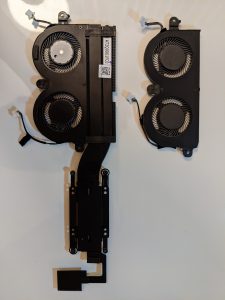
On the left is the assembly from the XPS 13 7390, and on the right is the fan module from the 9380.
The fans are actually composed of two parts: the rotor part and the shield. The rotor parts are the same whether they are from the 7390 or the 9380. Only the shields are different: the 7390 fan shield is welded to the heat pipes, while the 9380 fan shield is just a piece of metal.
See the following picture:
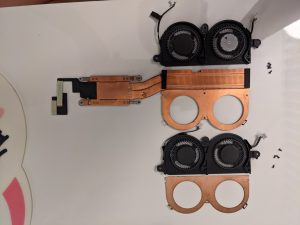
So I could just replace the rotor part. Awesome. I did that, and everything works like a charm now. It is so quiet.
By the way, if anyone is interested in how dirty the old fans were, here’s a picture:
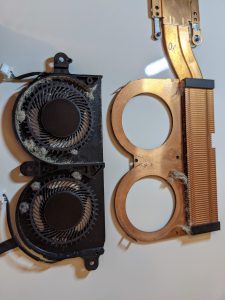
There was not a lot of dust, because I cleaned it once about one year ago, and I worked from home for the past year due to the pandemic. However, it does look like the dust affected the rotation of the rotors quite a bit. One of the rotors is cleaner. That one spun up less during the past year after I tuned the cooling profile.